

Developer Communities Admin
Community Manager
September 15, 2026

Hi, I have a question on the PATCH Employee API.

  • September 15, 2026
  • 6 replies
  • 2 views

Originally posted by Jeff Dooley on July 14, 2026 at 10:18 AM.


Hi, I have a question on the PATCH Employee API. I am updating the employee status and status reason to indicate the employee is on leave (changing the status from ACTIVE to INACTIVE with a leave reason) using the API which is successful.


In addition, I was seeing if the leave management data can be updated as well. If I look at the https://developers.dayforce.com/Build/API-Explorer/Employee/PATCH-Employee.aspx <link stripped through migration> there is a section on the leave of absence data :
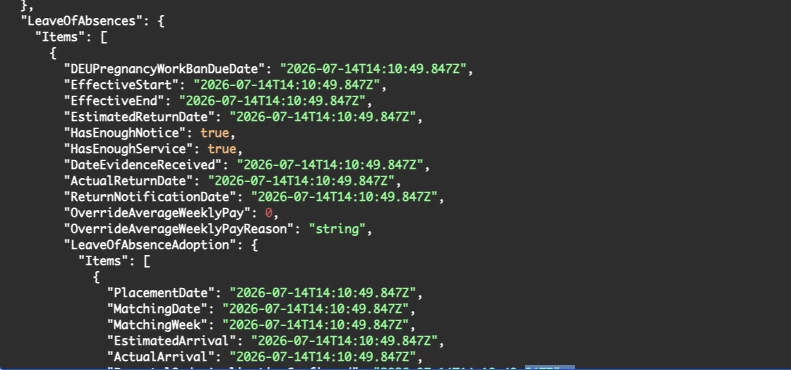
 

When I try to update i get the error below:


HR_Employee_EmployeeDataSaveFailure context=Employee : Failed to Save Employee Data

HR_EmployeeLeaveOfAbsence_EmployeeEmploymentStatusIsRequired context=EmployeeEmploymentStatus : Status - Value is required

HR_EmployeeLeaveOfAbsence_EmploymentStatusReasonIsRequired context=EmploymentStatusReason : Reason - Value is required


If I look at the body definition I do not see EmployeeEmploymentStatus or EmploymentStatusReason under LeaveOfAbsence. They are under EmployeeStatuses. If I add them I get the error they are not valid. If I try to update these values under EmployeeStatuses I get the same error - it seems to want them under LeaveOfAbsences. I know Leave management is not fully supported for US/Canadian customers at this time so is this simple not supported via API or I was wondering if anyone is able to update the leave of absences using the API?


    6 replies

    Developer Communities Admin
    Community Manager
    September 15, 2026

    Originally replied by Christopher Martyres on Jul 14, 2026, 4:01 PM.


    @Ted Fifield​ Can you review this?

    Developer Communities Admin
    Community Manager
    September 15, 2026

    Originally replied by Brenda Sutton on Jul 23, 2026, 1:57 PM.


    Hi @Jeff Dooley​, I just noticed that you never got an answer. Adding @Pascal Sutherland​ too since Ted is OOO for possible confirmation or additional insight. I spent some time looking into it because the behavior is a little confusing. The validation error is actually a good clue:


    HR_EmployeeLeaveOfAbsence_EmployeeEmploymentStatusIsRequired

    HR_EmployeeLeaveOfAbsence_EmploymentStatusReasonIsRequired


    Although the PATCH Employee schema exposes a LeaveOfAbsences section, the API is still validating the leave record against the employee's Employment Status and Employment Status Reason. Those fields exist under EmployeeStatuses in the request schema, but they are not part of the LeaveOfAbsences object itself.


    From what I can tell, the API is enforcing the same business rules that exist in the Leave Management application. In Dayforce, a leave of absence isn't an independent entity—it is tied to an employment status and a leave reason. That means the Leave of Absence object cannot be validated without those underlying employment status values. One thing to be aware of is that Leave Management functionality is not fully supported across all countries and customer configurations, so API support can vary depending on the tenant configuration.


    At this point, I haven't found documentation that confirms the LeaveOfAbsences object can be updated independently through the PATCH Employee API. Based on the validation messages, it appears that simply supplying the LeaveOfAbsences section is not sufficient, and the required employment status values cannot be added under that object because they are not valid members of the schema.


    A couple of questions that would help narrow this down:

    • Are you sending the EmployeeStatuses update and the LeaveOfAbsences update in the same PATCH request, or in separate requests?
    • Is Leave Management enabled for the tenant and country you're testing against?
    • Which country (US, Canada, UK, etc.) is the employee associated with?


    Brenda

    Developer Communities Admin
    Community Manager
    September 15, 2026

    Originally replied by Pascal Sutherland on Jul 23, 2026, 2:26 PM.


    This functionality is designed for the UK at the moment. I will confirm with that team in the morning, they are off for the day because of the time zone difference.

    Developer Communities Admin
    Community Manager
    September 15, 2026

    Originally replied by Jeff Dooley on Jul 23, 2026, 3:01 PM.


    Thank you @Brenda Sutton​ and @Pascal Sutherland​ for responding, to give you some more information:

    • I tried both sending in the same PATCH request and separate requests but got the same error. Here is a snippet from the same request :{"EmploymentStatuses":{"Items":[{"EffectiveStart":"2026-07-23T14:27:20.946-04:00","EmploymentStatus":{"XRefCode":"INACTIVE"},"EmploymentStatusReason":{"XRefCode":"FMLA"}}]},"LeaveOfAbsences":{"Items":[{"EffectiveStart":"2026-07-23T14:27:20.855-04:00","EstimatedReturnDate":"2026-09-23T14:27:20.944-04:00"}]},"XRefCode":"1234","FirstName":"Jane","LastName":"Doe"}
    • Leave Management is enabled in the tenant but I am trying with a US employee. I can manually add a Leave Management record for an employee under Employee Profile > Leave Management (even if it is not fully enabled outside of UK).
    • I am trying with a US employee, I understand it is for UK only at this time.
    Developer Communities Admin
    Community Manager
    September 15, 2026

    Originally replied by Pascal Sutherland on Jul 24, 2026, 5:10 PM.


    Hi Jeff,

    I confirmed with the team responsible for the leave of absence functionality and there isn't API support for it presently. It is something the team hopes to pick up for the next release.

    That is why you are being unsuccessful.

    Developer Communities Admin
    Community Manager
    September 15, 2026

    Originally replied by Jeff Dooley on Jul 25, 2026, 6:19 PM.


    Thank you very much @Pascal Sutherland​ I appreciate you and the team taking the time to look into it.