

Developer Communities Admin
Community Manager
September 15, 2026

What is the supported IDL pattern or UI configuration for conditionally omitting a date field in an expression?

  • September 15, 2026
  • 6 replies
  • 5 views

Originally posted by Barbara Buchanan on May 21, 2026 at 4:59 PM.


What is the supported IDL pattern or UI configuration for conditionally omitting a date field in an expression?


I am working on an inbound integration with multiple levels of mapping for a 401(k) loan import that will import as an EmployeeElectionImport. In the source file, if the "Status" is "Z", then the employee's loan deduction needs an end date. Otherwise, the EffectiveEndDate can be omitted. I have tried multiple ways to configure this condition but continue to get the error: Cannot format arbitrary string in param 'date'. Check that string is a valid Date/Time and that the data type is Date. String value: \"2026-05-21\"\n>>> EffectiveEndDate = format_date(vars([now(), (srcLoanRecord?.Status? ?? nil)], (enddate, status) => if (((status? ?? nil) ?? nil) =~ \"Z\") {",


It seems to get caught up somewhere in the omitting of the field that is formatted as a date.


Using conditional mapping, I have tried:
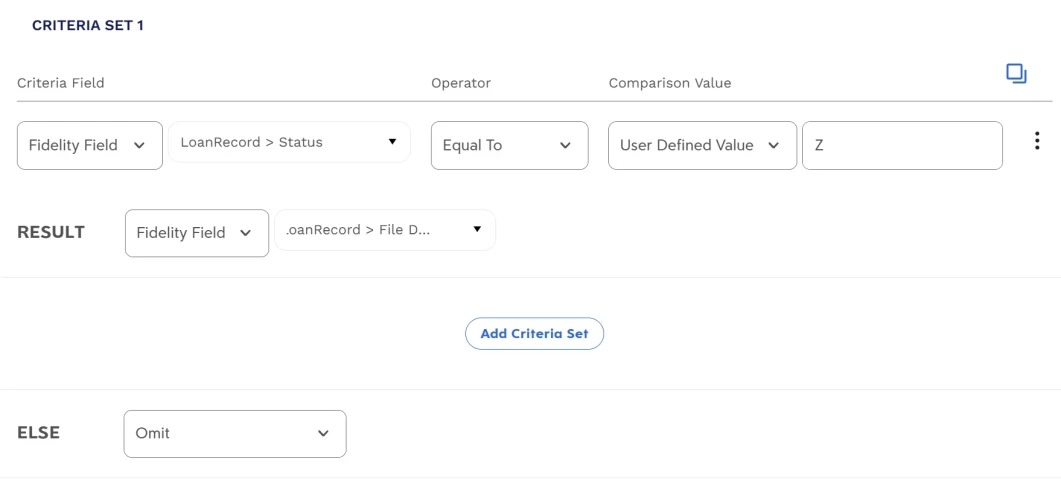
Which produces an IDL expression:  

I have tried writing an expression for the field, the most recent iteration being: 
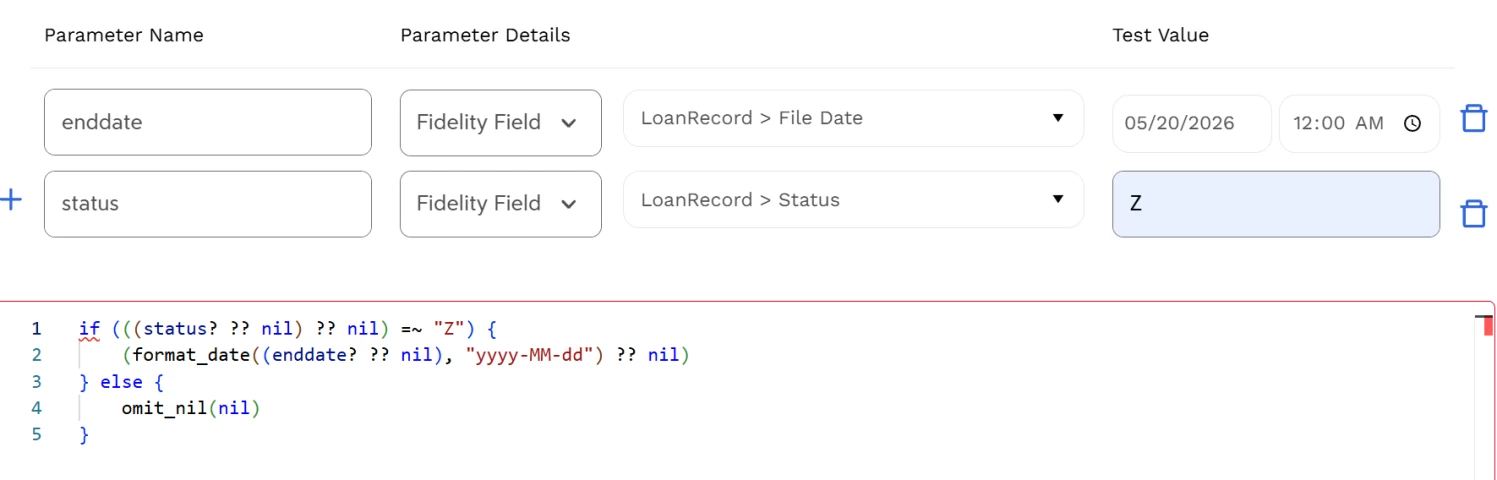
Any thoughts? Suggestions? Thank you so much!

    6 replies

    Developer Communities Admin
    Community Manager
    September 15, 2026

    Originally replied by Jeff Dooley on May 22, 2026, 10:59 AM.


    Hi @Barbara Buchanan​ is "File Date" is the data element for the end date defined as a Date or String? The format_date function returns a Date as a String value. If the field element is defined as a Date I think you can use the Data Format on the element to format the date as "yyyy-MM-dd" and then in the expressions just pass the date value through:


    Otherwise you could try to define the "end date" data element as a String and then use format_date() to output the file date as a String in the format yyyy-MM-dd.

    Developer Communities Admin
    Community Manager
    September 15, 2026

    Originally replied by Barbara Buchanan on May 22, 2026, 2:14 PM.


    Hi @Jeff Dooley​. Thanks for responding. "File Date" is mapped to [IntegrationRunDate] and is defined as a date on the element. It seems Dayforce is adding the format_date in the IDL. I tried removing the Condition to just map to [IntegrationRunDate] and you can see in the attachment that all the dates use format_date and all other dates load successfully. (And I might add, even Claude 4.7 is at a loss.)


    Developer Communities Admin
    Community Manager
    September 15, 2026

    Originally replied by Barbara Buchanan on May 28, 2026, 5:21 PM.


    In case anyone is interested, I could not get IDL or conditional formatting to work with EffectiveEndDate (and this may be an issue with other dates as well). Instead, I added an end date of 2079-01-01 as the conditional end date for any open/new Payroll Election and used the File Date as the end date for any election that was ended by the import file.

    Developer Communities Admin
    Community Manager
    September 15, 2026

    Originally replied by Brenda Sutton on May 28, 2026, 5:38 PM.


    Hi @Barbara Buchanan​, the strongest way to prove a systemic IDL/XML-generation issue is to strip the integration down to a minimal reproducible case, then compare the generated IDL and the runtime logs against that same input. Dayforce recommends using the Integration Log, Job Logs, Integration Response Log, and View IDL to pinpoint whether the failure is in retrieval, manipulation, or transmission; if the error shows up as a

    MappingSource.idl

    issue, use the line and column in the IDL editor to inspect the exact expression that broke.

    For a true “is this the platform or my mapping?” test, I would do this in order: first, confirm the issue survives in a fresh test integration with just one source record and one mapped field; second, download the source data, restructured source data (if you have multiple mapping steps), and destination data from the Integration Log; third, compare the source profile JSON, destination profile JSON, field-mapping definitions, and scrubbed source sample if you are using Integration Studio rather than hand-written IDL. Dayforce explicitly says those are the materials to provide when asking for help, and it also notes that invalid configurations can show save-time warnings/errors and may now fail immediately at run time in current releases.

    What usually tips the scale toward “systemic” is this pattern: the same minimal repro fails across different test data, the generated IDL looks structurally wrong rather than field-specific, and the error points to schema/structure problems such as ambiguous paths, missing top-level arrays, or fields placed under the wrong parent. The docs call out those exact failure modes, including ambiguous paths through arrays and parent/array structure requirements for XML/JSON output.


    If you still have an issue after trying the above let me know and I'll bring in an SME to see if they add anything to help.

    Developer Communities Admin
    Community Manager
    September 15, 2026

    Originally replied by Barbara Buchanan on May 28, 2026, 5:25 PM.


    @Frank Ruffolo​  or @Brenda Sutton​, if, after trying a dozen options, I think there is an systemic issue with the IDL or XML generation for an import file, what is the best way to address and/or confirm that? Thank you.

    Developer Communities Admin
    Community Manager
    September 15, 2026

    Originally replied by Barbara Buchanan on May 28, 2026, 5:45 PM.


    Thank you, @Brenda Sutton​! This helps and I will gather the info. 😁