New Participant
Oct 12, 2026 12:28 AM UTC
Solved

What permissions do I need to enable a user (web service user) to edit username/loginid via RESTful APIs?

I’m currently setting a new role for an web service user. I need the user to be able to view and edit their Dayforce username/loginid via the RESTful API.

They are authenticated using the token based authentications.

I’m using the /employee/{clientNamespace}/V1/Employees/{xRefCode} endpoint.

I have already enabled the following (only including ones that seem relevant):

  • Web Services Field Level Access > RESTful Services > Human Resources > Employee > LoginId
  • Authorisations (can create, read, update, delete):
    • HRMS_PERSONAL
    • HRMS_PERSONAL_XREFCODE

I am able to login, get a token, and read other fields and extract reports. I get the following error on Postman when I try to edit the loginid.
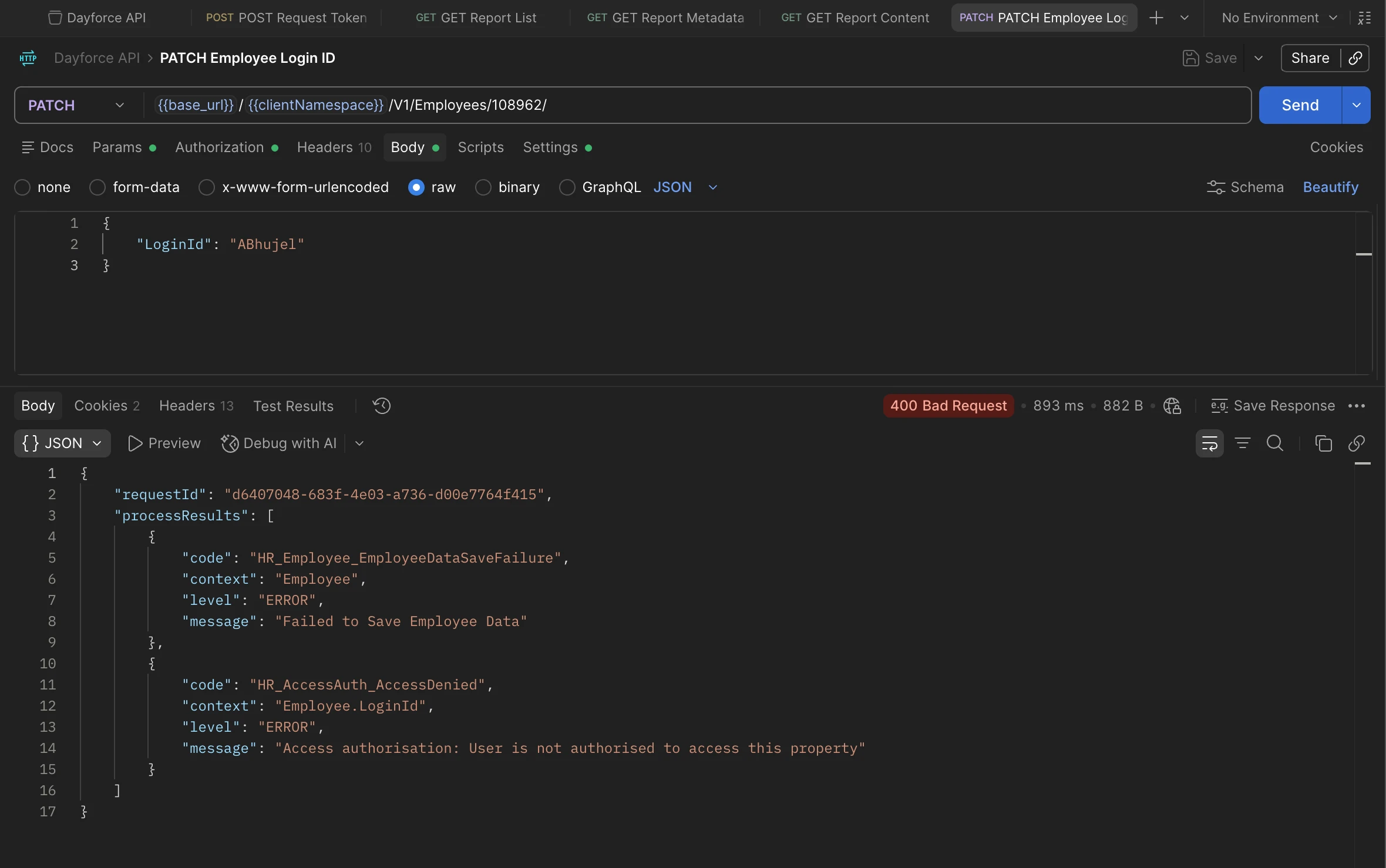
I’m thinking I need to enable other thigns in authorisations but nothing that I’ve tried seem to be working at the moment. I would appreciate it with someone could point in the right direction. Thank you!

    Frank.R
    Frank.RAnswer
    Community Manager
    Oct 14, 2026 1:00 PM UTC

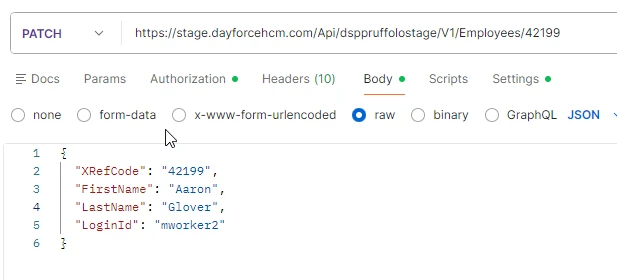
    Hey ​@jieshunwang sorry, I was able to update the LoginId field with the below payload and Authorization:


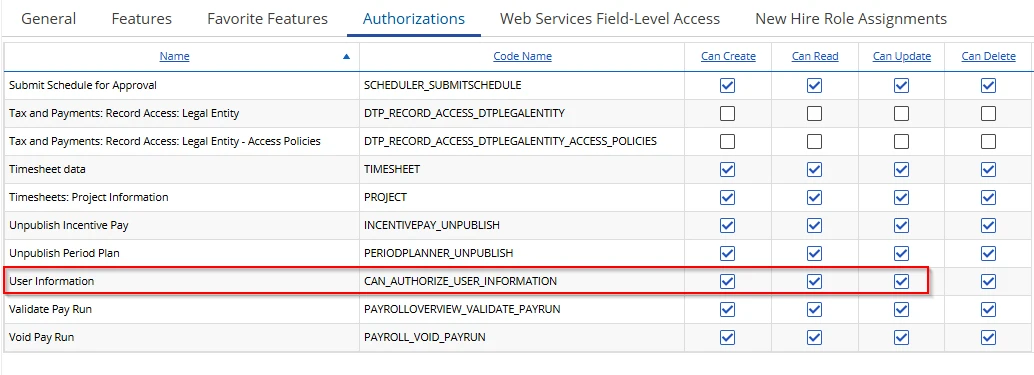
    Ensure you have the below checked :


    4 replies

    Frank.R
    Community Manager
    Oct 13, 2026 5:27 PM UTC

    Hey ​@jieshunwang , I believe you need to add Employee Profile - Security Settings - SSO Logins under Authorizations. 


    When calling the Employee endpoint you will have to use Expand and retrieve SSOAccounts

    eg. 

    ddn/V1/Employees/42199?expand=ssoaccounts
    New Participant
    Oct 13, 2026 10:48 PM UTC

    Hi ​@Frank.R ,

    Thank you for the response. I am referring to their native Dayforce authentication username here, not their SSO login ID. 

    Under their Employee Profile > Security Settings:

    I’ve been successful in updating their SSO Login ID from the permissions you suggested above, but not their native Dayforce authentication username.

    Hoping you can help here!

    Frank.R
    Frank.RAnswer
    Community Manager
    Oct 14, 2026 1:00 PM UTC

    Hey ​@jieshunwang sorry, I was able to update the LoginId field with the below payload and Authorization:


    Ensure you have the below checked :


    New Participant
    Oct 14, 2026 10:36 PM UTC

    It worked. Thank you for your help!