

Developer Communities Admin
Community Manager
September 15, 2026

While sending file to vendor I am getting below error message:

  • September 15, 2026
  • 1 reply
  • 2 views

Originally posted by Aman Gaur on March 13, 2026 at 10:39 AM.


Hello Community,


While sending file to vendor I am getting below error message:

 CTC-Test Unable to transmit file G000BLGH.txt.pgp.pgp. Please review BJE log file for detailed error message ---> Dayforce.Common.DayforceFtp.DayforceFtpException: Could not change to report directory: /test User [DFTEST1] has no view rights to [/DFTEST1/test].


Vendor specifically told us to put the file in test folder.


Any idea on what to do for this?

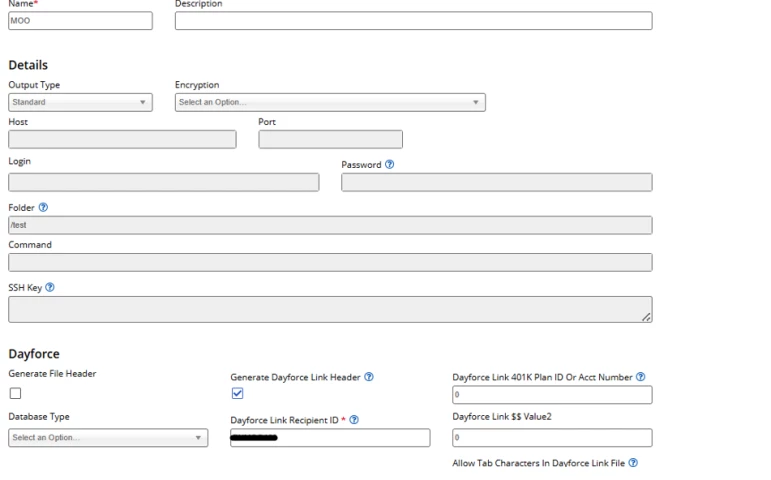
Below is my export option configuration.
 

    1 reply

    Developer Communities Admin
    Community Manager
    September 15, 2026

    Originally replied by Brenda Sutton on Mar 13, 2026, 3:10 PM.


    @Aman Gaur​, it kind of feels like a vendor issue but I'd the error does indicate the SFTP account DFTEST1 does not have permission to access

    /DFTEST1/test. Dayforce attempts to change into that directory before sending the file and the server is rejecting it.

    Since the Folder field is currently set to /test, the server is interpreting that as an absolute path. Depending on how the vendor SFTP root is configured, you may need to use a relative path instead.

    You can try updating the Folder value to: test